16 min read
The current Framer plans, the limits that actually matter, and my honest take on when I would choose Free, Basic or Pro.

Hamza Ehsan
Framer Partner · 2,300+ templates sold

If you’re trying to work out which Framer plan you need, don’t overcomplicate it. Free is for getting your hands dirty.
Basic is for a small site that needs a real domain. Pro is where I’d start if the website is going to be a proper part of your business.
That’s the short version. The longer version matters because Framer changed its pricing structure, and there are still plenty of old guides out there talking about plans and limits that don’t exist anymore.
I build and sell Framer templates, so I spend a lot of time thinking about where people get stuck. Usually it’s not because the tool is confusing.
It’s because they choose a plan based on the monthly number, then realise later that the setup they actually need doesn’t fit inside it.
My take before we talk about price
For a portfolio, a personal site or a simple service business site, Basic can be completely fine. You get your own domain and enough room to make something polished without paying for a bunch of extra stuff.
But if you’re building a content-led site, a template store, or anything you’ll be changing regularly, I’d probably go straight to Pro. Not because everyone needs the most expensive option.
You don’t. It’s just much nicer when you have enough CMS room, redirects and a safe way to check work before it goes live.
What Framer costs right now
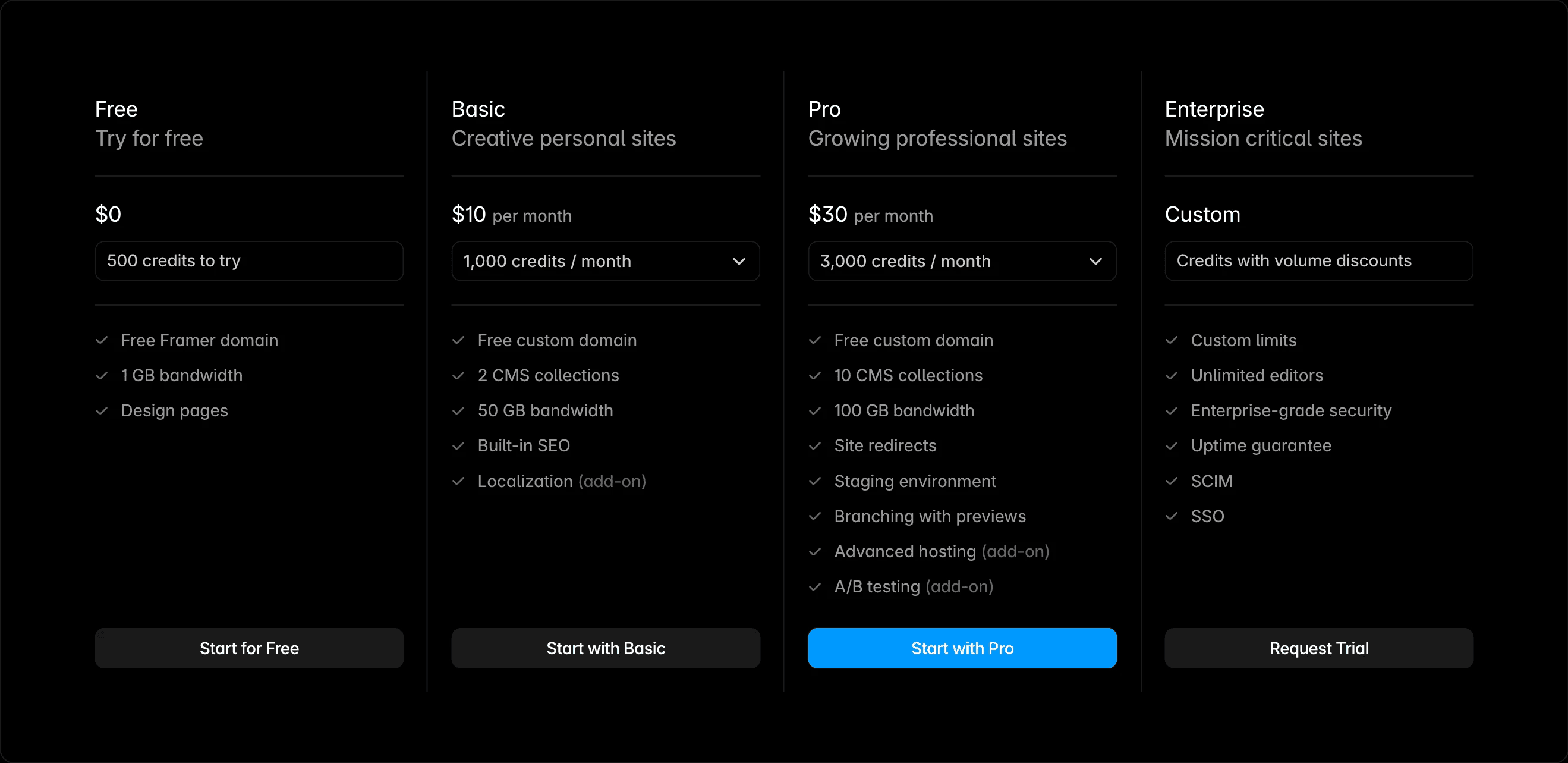
Framer’s current pricing page, checked in July 2026.
Framer has four current plans: Free, Basic, Pro and Enterprise. On the yearly billing option, Basic starts at 10 dollars a month and Pro starts at 30 dollars a month.
Free is free. Enterprise is custom.
I’m being specific about the yearly option because that’s what Framer shows on its pricing page. Your final total can change depending on billing cycle, tax, seats and any add-ons.
So use this as the starting point, then check Framer own checkout before you buy.
Free: good enough to actually learn on
Free gives you a Framer domain, 1 GB of bandwidth and the core design environment. Framer also includes 10 CMS collections, 1,000 pages, 5 MB uploads and one locale to try.
That’s more than enough to learn the tool, build a real draft, or make a template. I wouldn’t pay before you’ve made something.
Build the thing first. You’ll know pretty quickly whether Framer’s the right fit for how you like to work.
The obvious limitation is the domain. Once you want the site to feel like a real public thing, rather than a project you’re testing, that’s when Basic starts to make sense.
Basic: the small-site plan
Basic starts at 10 dollars a month on yearly billing. It gives you a custom domain, 2 CMS collections, 1,000 monthly credits and 50 GB of bandwidth.
That’s a good setup for a portfolio, a simple landing page, a consultant site, or a small service business. If the content structure stays light, you don’t need to force yourself onto Pro just because it sounds more serious.
Before choosing Basic, I’d think about CMS. Two collections can disappear fast.
A blog is one. Case studies, testimonials, categories, templates, FAQs or resources can each become another.
Pro: where Framer starts to feel properly flexible
Map that out first, otherwise you end up doing weird workarounds later.
Pro starts at 30 dollars a month on yearly billing. It has 10 CMS collections, 2,500 CMS items, 3,000 monthly credits and 100 GB of bandwidth.
More importantly, it gives you redirects, staging and branch previews. That’s the stuff people ignore when they are comparing plan cards, then really appreciate once the site has traffic and they need to change something without breaking it.
Redirects matter when you change URLs. Staging and branch previews matter when you want to look at work before the public site changes.
If you’re publishing articles, testing landing pages, or doing client work, that alone can make Pro worth it.
Enterprise: only when you already know why
Enterprise gives you custom limits, enterprise security and dedicated support. If you have a proper enterprise requirement, you’ll know.
Everyone else can usually make a clear decision between Free, Basic and Pro without getting distracted by it.
The limit that catches people out
For most sites, bandwidth isn’t the first thing to worry about. The CMS is.
Basic has 2 collections. Pro has 10.
A template store is a good example. You might need templates, categories, testimonials, blog posts, FAQs and related content.
That’s the bit that changes what you can comfortably build.
None of that’s particularly wild. It’s just a normal site that grows beyond two repeatable content types.
Pro can grow with you as well. Framer offers add-ons that can take it up to 40 CMS collections, 40,000 CMS items, 700 pages and 2 TB of bandwidth.
I wouldn’t buy capacity you don’t need, but it’s useful to know you’re not boxed in.
So, Basic or Pro?
I’d pick Basic when the site has one clear job and a small amount of repeatable content. A polished portfolio with a few projects.
A simple personal site. A service site with a blog that’s not going to become a huge content machine.
I’d pick Pro when the website is part of how you market, publish or sell. If content matters, if search matters, if you’re going to change the site often, or if someone else will be in there with you, Pro is just the more relaxed choice.
That doesn’t mean Basic is bad. It’s just easy to outgrow if you start with a lot of ambition and try to make the structure fit the plan instead of choosing the plan that fits the structure.
What about people on the site?
Viewers are free. Framer lists additional editors at 20 dollars a month and content editors at 10 dollars a month on Basic and Pro.
That’s worth remembering if you’re building for a client or have a writer, marketer or team member who needs access.
The site price can look great in isolation, then the total changes once several people need edit access. Not a reason not to use Framer.
Just something to budget for properly instead of being surprised later.
The add-ons you might actually care about
Most people don’t need any add-ons on day one. Localisation is 20 dollars per locale.
Convert starts at 50 dollars per 500,000 events. Advanced Hosting is 200 dollars and is for more involved multi-site and header requirements.
There are also expansion options for pages, CMS, items and bandwidth on Pro. I’d treat those as a growth tool, not a default setting.
Get the site working first, then pay for the specific limit you’re actually hitting.
Do you need Pro for SEO?
There’s no magic SEO plan. You can build a good site on either paid plan.
The reason I lean Pro for content-led sites isn’t because Google gives it points. It’s because redirects and a safe review workflow make it easier to improve a site without being reckless with pages that are already ranking.
If you have one small stable site, Basic can absolutely be enough. If you’re regularly refreshing content, cleaning up URLs or testing pages, I’d rather have the safer workflow.
My recommendation
Start on Free if you’re still figuring Framer out. Pick Basic if you need a clean, small site on your own domain.
Pick Pro if the site is going to be part of your actual business and you want room to grow without constantly thinking about the plan limits.
And if you’re ready to build but don’t fancy starting with a blank canvas, have a look at my template store. The templates are built for Framer and made to be customised, not just copied.
How I’d think about the Free plan
Free is where I’d start if you’re new to Framer. Not because it’s the cheapest answer.
Because it lets you find out whether you actually like building in it before you turn a plan comparison into a big decision.
Make a real page. Try the CMS.
Put some content in. Break things a bit.
I think people sometimes dismiss Free because it has a Framer domain. But as a learning and building environment, it’s genuinely useful.
The plan has enough room for that. Then, if you get to the point where you want the site on your own domain, Basic is a very natural next step.
You don’t need to pay to get far enough to have an informed opinion.
The CMS question, properly
The CMS limit’s the one I’d pay attention to before anything else. It’s easy to look at two collections and think, yeah, I probably only need a blog.
But a blog is usually not the only repeatable content on a site for long.
Say you have a portfolio. You might want projects, testimonials, services, FAQs and articles.
Or a template store. You might want templates, categories, updates, blog posts and testimonials.
You can absolutely keep a Basic site simple and well organised. I just wouldn’t pretend two collections are a long-term fit for a site that’s meant to grow into a proper content operation.
That’s not overbuilding. That’s just giving the site somewhere sensible for its content to live.
In that situation, I’d pick Pro and move on.
When the price difference isn’t really the price difference
Basic at 10 dollars and Pro at 30 dollars feels like a clear comparison. But it’s not just 20 dollars for more limits.
It’s 20 dollars for being able to make changes with a bit less anxiety once the site matters.
If you never need to touch URLs, never publish content, never collaborate and never test anything, you probably don’t need that. But most business sites do eventually get there.
That’s why I see Pro as a practical choice, not a prestige plan.
What I’d do for a client site
For a very small client site, I’d happily use Basic if the scope was clear and the content structure was light. There’s no point selling someone a bigger plan just because it’s easier for me to explain.
For anything with regular content, campaigns or multiple people involved, I’d use Pro. Branch previews and staging give you somewhere to check work before it hits the public site.
That’s one of those things that feels unnecessary until the first time it saves you from a bad update.
A quick checklist before you choose
Write down the content types you need. Count the people who need to edit, not just view.
Decide whether the site will be published once and left alone, or whether you’ll keep improving it. Then look at the plan.
If the answer is still not obvious, start Free. You’re not locking yourself into anything.
Doing it in that order makes the answer much clearer.
Build enough of the site to see its real shape, then choose the paid plan based on what you have actually made.
Why I still use Framer
The reason I keep coming back to Framer isn’t that it’s perfect or that every project belongs on it. It’s that it lets me get from an idea to a good-looking, live site quickly, while still giving me enough control to make the work feel like mine.
That’s also why I care about the plan decision. The right plan should get out of the way.
You shouldn’t be spending your time wondering whether your blog or template library has outgrown the setup you chose to save a bit of money at the start.
This guide is based on the current structure, but the live source should always win over an old screenshot, video or blog post.
How Framer Agent credits work
This is the part that has confused a lot of people since Framer introduced Agents. At first glance, the pricing can feel a bit all over the place. But once you understand what the credits are actually doing, it is fairly straightforward.

Framer Agents can help with design, content, CMS, analytics and site updates.
Framer gives each workspace a shared monthly pool of AI credits. Free workspaces get 500 credits a month. Basic gets 1,000 per paid site, and Pro gets 3,000. If you have more than one paid site in the same workspace, those credits stack together.
The important bit is that this is not a fixed cost per prompt, and it is not a separate allowance for every person on the team. A quick edit uses fewer credits. A bigger job that changes pages, CMS content or layout uses more.
The credits reset on the first day of each month, and unused credits do not roll over. If you hit the limit, the credit-using tools pause, but any request already running gets to finish. Framer also keeps lighter editor helpers working, so the whole product does not suddenly stop.
If you need more, Framer has a recurring AI Credits add-on. You can then buy a one-off top-up as well, but only if that recurring add-on is active. The top-up expires at the end of that calendar month.
My honest take is that it is still too early to say whether the pricing will feel good over time. The model is a little confusing at first. But it does make more sense once you see it as one workspace budget for the heavier AI work, rather than a charge every time you type a prompt.
If you are using Agents a lot, I would just keep an eye on usage for a month before making a bigger call. That will tell you more than trying to guess from the pricing page alone.
A final note
Pricing changes. So if you’re reading this months from now, check Framer’s official pricing page before making the call. This guide is based on the current structure, but the live source should always win over an old screenshot, video or blog post.
More posts on Framer and building websites that work.
Framer Templates: The 8 Best Picks in 2026 (Free & Paid)
10 Best Framer Portfolio Templates in 2026